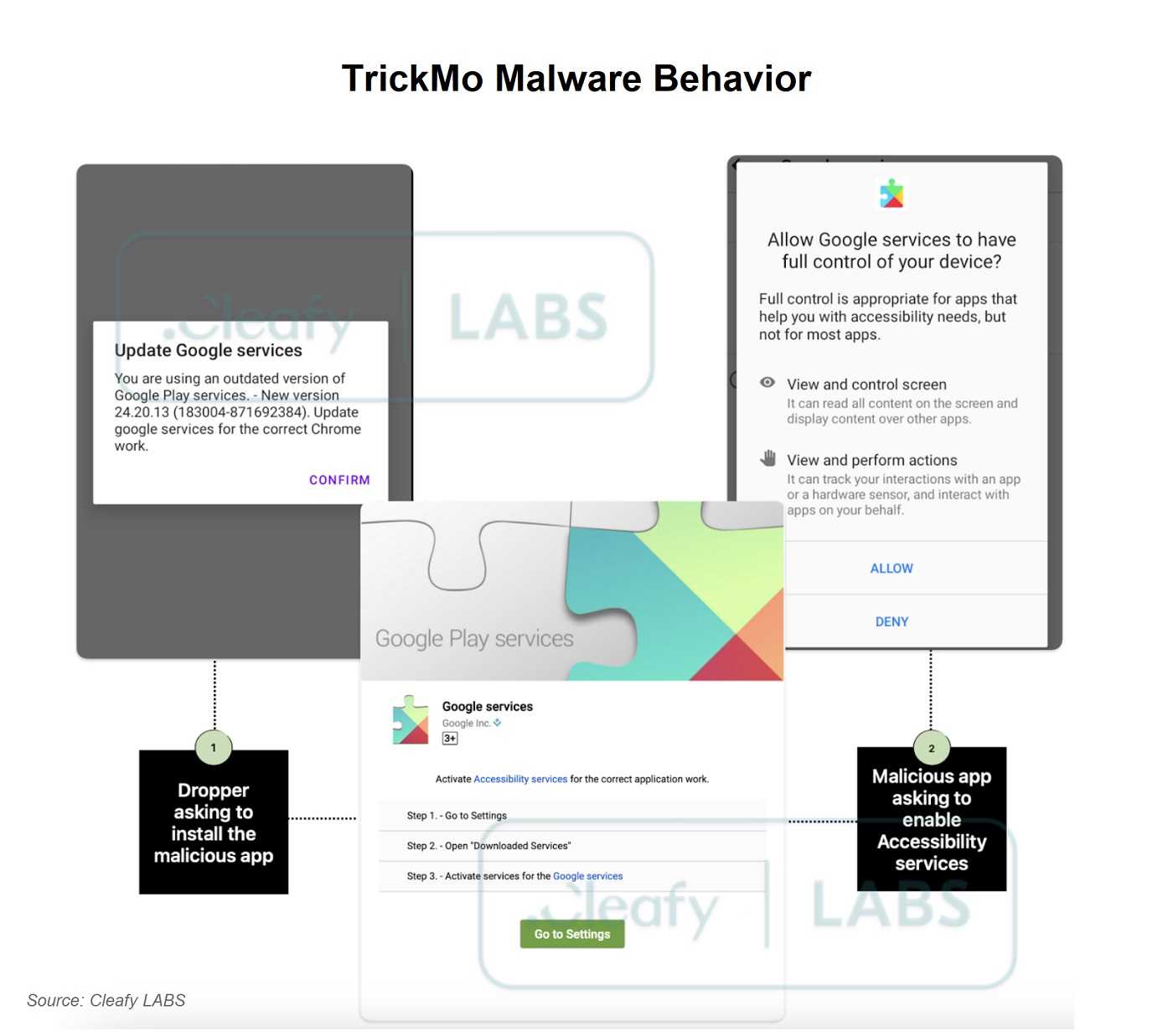
The TrickMo Android banking trojan has re-emerged in a new form, disguised as a fake Google Chrome app for Android. Once installed, this malicious app prompts users to update Google Play Services, tricking them into downloading TrickMo under the guise of "Google Services." By doing so, it gains access to critical permissions, including those for the device's accessibility settings, which it then exploits to perform various malicious activities.
This new iteration of TrickMo is particularly dangerous because it can intercept SMS messages, steal one-time passwords (OTPs), record screen activity, and perform HTML overlay attacks. These overlay attacks mimic legitimate banking and crypto login pages, tricking users into providing sensitive credentials. The trojan also enables remote control of the device, allowing attackers to execute unauthorized actions without the user's knowledge.
Furthermore, TrickMo's advanced capabilities allow it to bypass traditional security, such as a password. It uses malformed ZIP files and employs techniques to evade detection, making it even more challenging to identify the threat.
To avoid becoming a victim, Android users should download apps only from the official Google Play Store. In other words, don’t sideload apps or get them from third party sources. Also, regularly updating devices and avoiding granting unnecessary permissions is crucial to keeping secure, and is appropriate for all users. If your app doesn’t need access to a service, don’t enable it. Try using it with the least number of permissions and see if it works. It’s a very rare time that any app needs access to the accessibility settings or needs developer access. Activating Google Play Protect and staying vigilant against suspicious updates or popups are also key steps to protect against such malware.
For banks and credit unions
Share this article with your members
Copy a ready-made summary and link for your newsletter, website or social posts.