Think you're safe downloading software from the top Google search results? Think again. FortiGuard Labs discovered a massive SEO (that’s Search Engine Optimization) poisoning campaign, primarily targeting Chinese-speaking users, but the tactics being used could easily spread to English-speaking audiences next…and as is typically the case, they likely will.
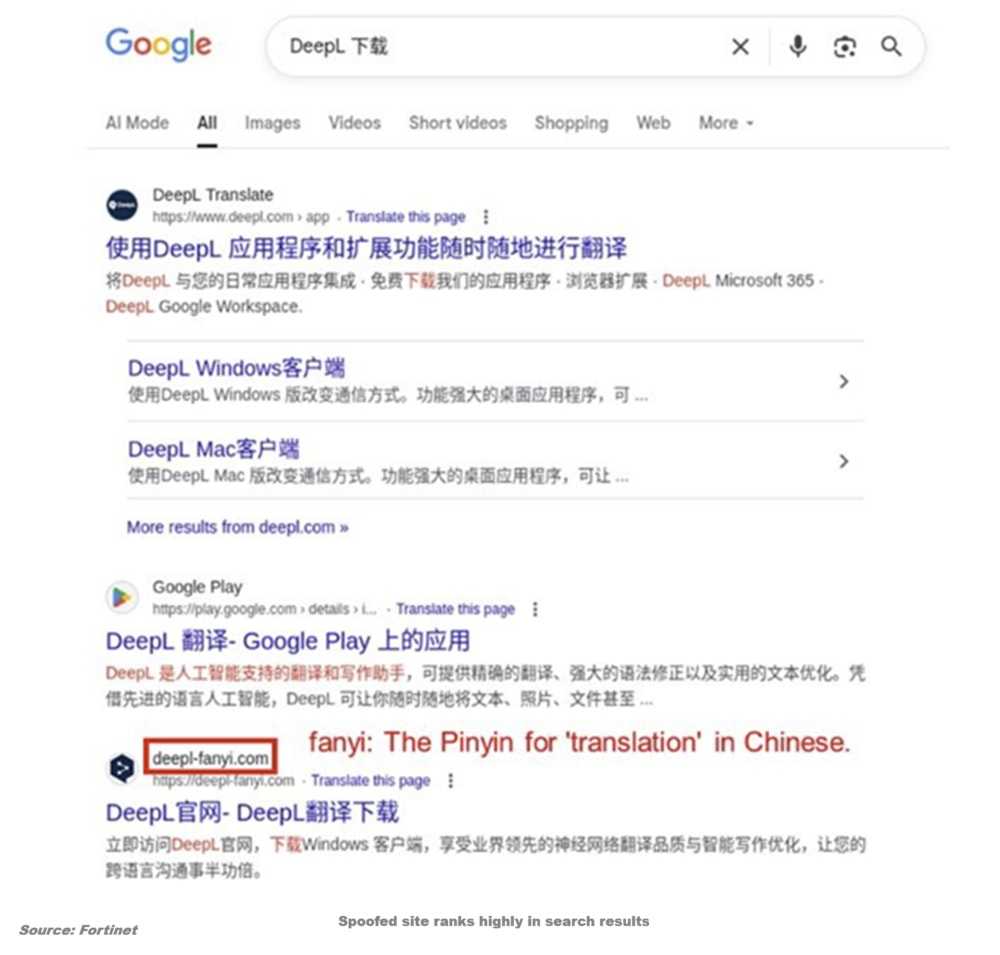
Here's how the scam works: Cybercriminals create fraudulent websites that look almost identical to legitimate software providers and use special plugins to artificially bump these fake sites to the top of search rankings when you type something into the address window. When unsuspecting users click what appears to be a trustworthy download link for popular apps like DeepL, Signal, WhatsApp, Chrome, or Telegram, they're actually getting a malicious installer.
The really scary part? These installers combine both the legitimate software and malicious components, so everything appears to work normally while malware silently infects your system in the background. Attackers registered lookalike domains and used subtle character substitutions to mislead users, making the fake sites nearly impossible to distinguish from the real thing at first glance. So, you got the product you wanted so of course, wouldn’t ask any questions.

2
Once installed, the attack delivers powerful malware families including Hiddengh0st and Winos, which are variants of remote access trojans. These give hackers complete control over infected computers, allowing them to steal sensitive information, log keystrokes, monitor your screen, hijack cryptocurrency wallets, and establish ongoing access to your system.
The malware also seems to be able to detect if it's being analyzed and discovered. It checks for virtualized environments and if detected, it simply shuts down and leaves no trace.
 How To Protect Yourself
Don't trust search engine rankings alone. Always verify you're on the official website by carefully examining the domain name for subtle misspellings or character substitutions. These are “1” in place of a lower case “L,” for example. When possible, navigate directly to a company's website rather than clicking search results. Before downloading any software, double-check the URL and look for signs of legitimacy like proper SSL certificates and official company information. If it looks odd, trust your gut.
SEO poisoning attacks are becoming increasingly common because they work. Hackers know we trust Google's top results, and they're exploiting that trust to distribute malware at scale. Stay vigilant, and remember: if you're searching for software downloads, the safest bet is always going directly to the official source.
For banks and credit unions
Share this article with your members
Copy a ready-made summary and link for your newsletter, website or social posts.