You think all apps in the Google Play Store are safe? Think again. While Google does have security check processes in place, some bad apps still make it into the store. A recent analysis by Zscaler reveals a significant surge in malicious app downloads from the Google Play Store, highlighting the escalating risk for Android users.
Between June 2024 and May 2025, the firm identified a large number of harmful applications collectively installed tens of millions of times from the official App Store. The total count of unique malicious apps rose to 239—up from about 200 the year before—and together these apps were downloaded more than 40 million times.
The upward trend marks a roughly 67 percent year-over-year increase in Android-focused malware activity. According to the report, most of these apps fall into a few major threat categories.
- Adware
- Spyware
- Banking Trojans
Adware accounts for nearly 70 percent of mobile threat detections.
These threats are becoming more sophisticated and harder to detect, often hiding behind seemingly legitimate apps that easily attract unsuspecting users.
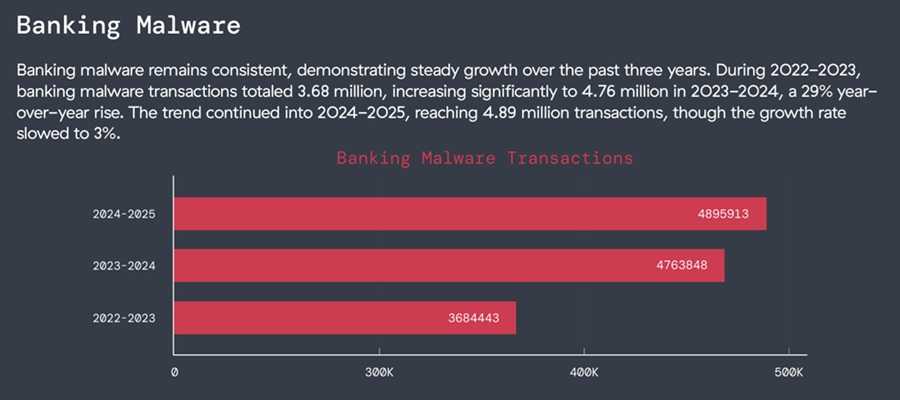
Banking trojans, in particular, continue to evolve, targeting mobile payment systems and stealing credentials through overlay scams and fake login screens. Many exploit mobile payments and use phishing to conduct attacks such as SIM swaps and payment scams.
Spyware, meanwhile, saw a dramatic increase, with a sharp rise in apps capable of tracking user activity, harvesting sensitive data, or activating microphones and cameras without consent.
Zscaler’s findings underscore that even Google’s official Play Store remains a viable distribution channel for cybercriminals. While Google has removed most of the identified apps, millions of devices may still harbor infected versions. Many of these continue to do damage long after they’ve been removed from the Store, because people still use them without knowing they are malicious.
To stay safe, users should download apps only from trusted developers, review permissions carefully, disable accessibility permissions (if you don’t need them), keep devices updated, and rely on built-in protections like Play Protect.
And although, as discussed, malicious apps still do make it into the official stores, it’s still your best bet to use those over sideloading apps from sources other than those stores.
For banks and credit unions
Share this article with your members
Copy a ready-made summary and link for your newsletter, website or social posts.