


Phishing is in the information security news a lot. Unfortunately, there is a reason and it's not necessarily a good one. It's successful, so scammers keep doing it.
Phishing is defined as an attempt to acquire personal or sensitive information such as user names, passwords, and financial information by pretending to be legitimate and trustworthy. It is at the foundation of many cyber attacks and is a type of social engineering.
Typically phishing is done via email messages with a link or attachment intended to be clicked. When it is, some nefarious action follows, like installation of malware. The bottom line is that it is very important to recognize a phishing attempt in order to avoid providing information to someone that has less than good intentions.
The good news is that it's not rocket science to figure it out. The image below shows an example of a phishing email purportedly from Bank of America requesting that the user sign into his or her account by clicking an included link:
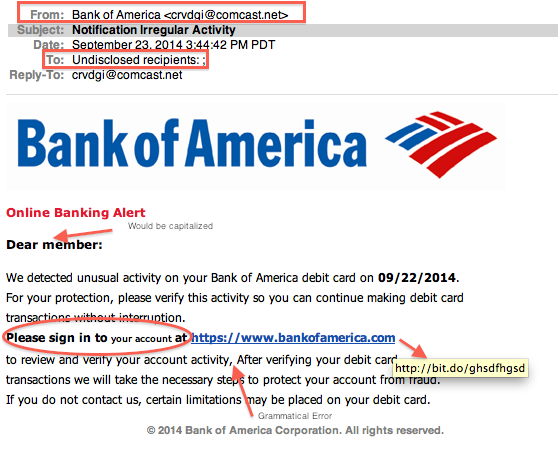
First, if you don't have a Bank of America account, you should not even have to give it another thought. Just delete it. Unfortunately, many people still open the attachment or click the link.
Second, it was filtered by the email client as "junk" which typically happens when a message is sent to a large number of email addresses. It isn't always the case that it's spam, but it's a reason to look further into the details before clicking anything.
Third, the sender's email address was odd: crvdgi@comcast.net. If it were legitimately from Bank of America, it would have a Bank of America email address.
Fourth, the format is inconsistent and includes several grammatical errors. It's not unreasonable to find an occasional typo or format error in email messages, but it warrants further analysis.
Last, but not least, if the mouse hovers over the link in the message, it directs to a strange and unsecured URL. Notice that there is no "https://" in the address there.
If it's necessary to update account details, it's advised to manually type the link to the account into the address bar of the browser or use a previously bookmarked link. In addition, pay attention to the sixth sense when it comes to email. If it seems strange, it probably is something that's better deleted right away. If in doubt, ask the sender first.
By taking a few extra moments to notice the details, it can prevent costly and frustrating mistakes resulting from clicking malicious links or opening attachments loaded with viruses.
For banks and credit unions
Share this article with your members
Copy a ready-made summary and link for your newsletter, website or social posts.




