

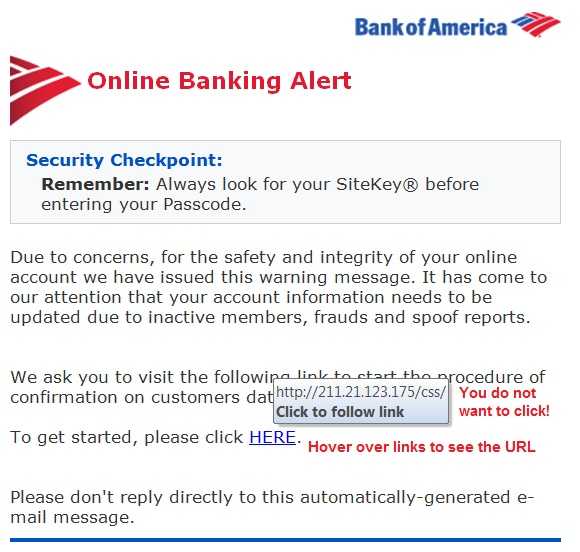
If you are wondering what types of companies are targeted most by hackers, Websense Security Labs has an answer. According to a report that includes data from January to May of this year, financial services firms top the list. The rate at which these types of businesses are targets is 300% more often than organizations in other verticals. What are the hackers after? Most often it is credentials for online banking.
The most common types of attacks that attempt to get this information are Geodo, Rerdom, and Vawtrack. These are all spread via email messages that go phishing for information. Geodo, which is a newer version of the Cridex malware is used 400% more often than in any other industry. It usually involves a user opening an attachment infected with malware which takes advantage of Microsoft Office macro functionality. Rerdom is a spam generator, which sends massive amounts of email to unsuspecting users with links or attachments that contain malware that harvests credentials. Vawtrak is a Trojan that attempts to steal passwords and uses browser histories and cookie information, as well as digital certificate information to obtain credentials. Always watch out for phishing attempts. This method of stealing information remains the top of the list as a strategy for hackers.
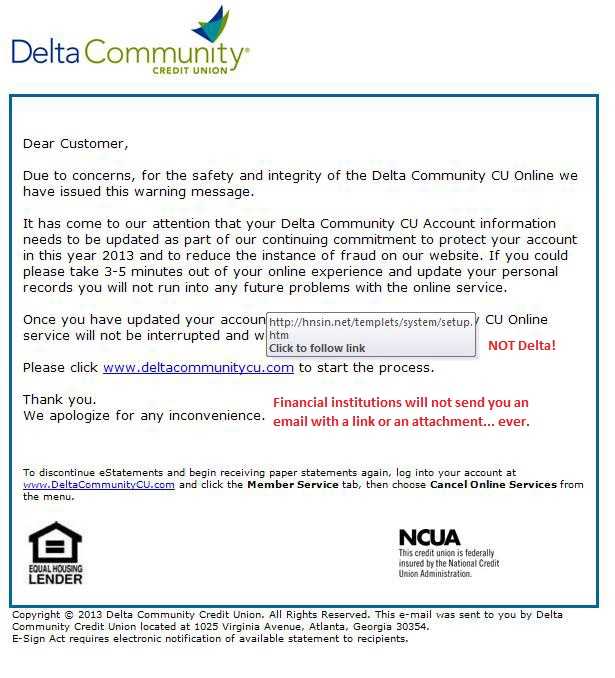
Often malware is embedded in attachments that come in phishing emails. When the attachment or link is clicked, it sets off some type of action allowing the malware to be released to search for information or otherwise wreak havoc. There are typical indicators for recognizing phishing. If it's email, the messages contain poorly written text, typos, and punctuation mistakes. The sending email address may even be known by the recipient, but it is easy to spoof that information. Make sure to expand the email address to see the complete version of it. Even if the sender truly is someone familiar, always be 100% sure it is OK to open anything inside. Place a quick phone call to the sender if necessary. If there is a link, hover over it with the mouse to see if it directs to where you think it should. If in doubt, just don't go there.
Make sure anti-malware is installed and updated on all devices. This will help detect much of the malware that does arrive in email messages. Many, if not most browsers also have anti-phishing features. Turn those on as well. Check the settings and options for the browsers you use.
For banks and credit unions
Share this article with your members
Copy a ready-made summary and link for your newsletter, website or social posts.




