

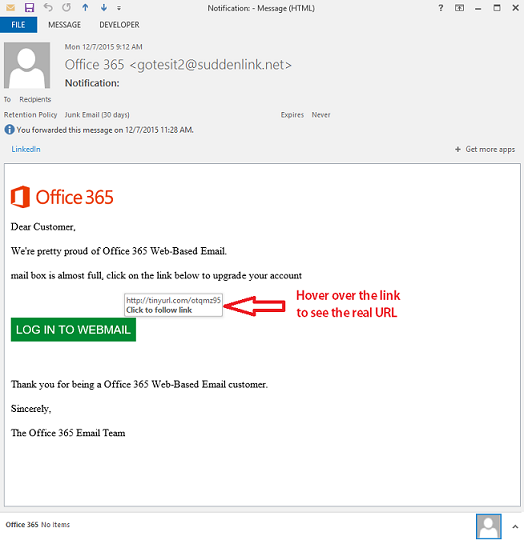
It's a good idea to always be on guard for phishing scams, but there is one going around right now that is getting plenty of clicks. The fake email claims to be from Microsoft Office 365 letting you know that your mailbox is full. It is a very convincing looking email, but by hovering over the link, you will see that the URL is not from Microsoft.
2
- Don't click on links or open attachments in emails unless you are certain they are safe. This is how malware is mainly delivered, so it is largely in your control to stay malware free.
- If link or attachment is from a fellow employee, it's better to place a phone call to the sender to validate the link or attachment was intended.
- You can see the actual URL by hovering your mouse over the link. But Keep in mind that phishing scams are getting much better at creating URLs that are very close to the URL in the scam. So we recommend that you manually type URL into your browser just to be safe.
- Many times, phishing email messages are sent by those who are not proficient in the language of the users they are targeting. Phishers may also struggle with correct use of grammar, make typos, and not punctuate correctly. While many native speakers also struggle with this, professional organizations typically make sure their messages do not get sent that way.
- Never type confidential information, such as login credentials, into anything that gets sent via email. Most email is not secured and traverses the Internet in plain text
For banks and credit unions
Share this article with your members
Copy a ready-made summary and link for your newsletter, website or social posts.




