

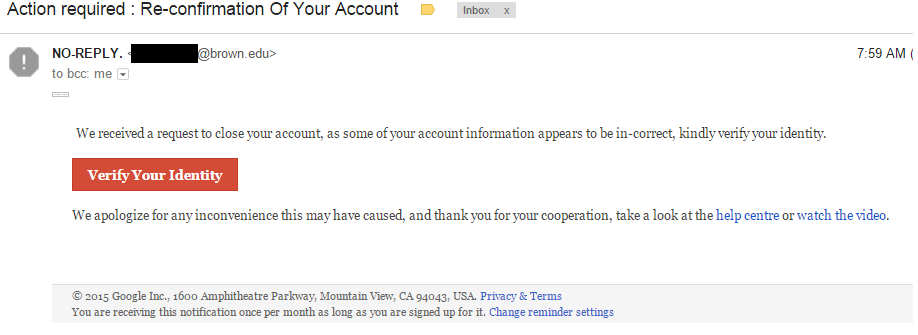
Brown University email account holders may be being targeted in a massive phishing campaign. Kaspersky Labs reported receiving email messages from Brown University “NO REPLY” senders that request the recipient to verify their Google Accounts. More on why that isn’t so strange later.
Phishing itself is not new and the message the researchers reported receiving were not particularly well-disguised for those who know what to spot. However, the signs were subtle enough that if warning fatigue kicks in, they could be missed. In addition, they did include a photo of the sender, which may or may not have been an employee, student, or staff member tied to the University. Photos are not normally part of a phishing message. This phisher was trying hard to make it appear real.
What the researchers found to be particularly strange in addition to the photo was that the message passed through the spam filters for Gmail, which are normally good at catching such things, and that it asked the reader to verify their Google account.
 First, the lessons. Know how to recognize phishing. It is extremely common and the top way that cybercriminals steal information, disseminate malware, and conduct their nefarious acts.
- Check out the language and how it’s used. Often, there are several typos, the punctuation is not used properly, and the grammar is misused. In this case, there are two periods at the end of the sentence which should be multiple sentences and the “T” in “team” should be capitalized.
- The logos are often a bit different or not copied well. In this case, the logo used was an old one. A subtle difference that most probably wouldn’t spot right away.
- The message tries to get the reader to panic or make a hasty move that ends up giving information to the phishers. In this case, it threatens to close the recipient’s Gmail account, if they don’t verify their details.
- There are typically links to click or attachments to open. However, if you hover over them, they go to a location that doesn’t make sense. For example, if Google sends a message to verify something, that link should go to Google’s website and not a version of “hokiti-bobo-crew[.]net/< your ip>/index.html” as this one did.
If the link is clicked in these phishing messages, the user is taken to a fake page and asked to enter information. Once the account information including details that Google would not ask for such as birthdate are entered, the page is redirected to the user’s actual Google account, which was never touched in the first place.
At that point, the damage is done and the information has been recorded by the attackers.
A similar situation, still using the Brown University domain has been seen on LinkedIn. The sender was a former university employee who is a current employee of LinkedIn. What is to note on this one is that the template was specific for LinkedIn, indicating that whomever has likely taken over the university’s servers is organized and has several templates to use for various websites. However, the signs that it is phishing are still identifiable.
The Brown University email is hosted on Google servers. Therefore, being asked to verify those accounts is not so far-fetched. However, it is important that no matter how busy we all get in our daily lives that we take a few minutes when a dialogue appears and read it closely before taking any action. This attack appears to be active and on-going and it's unknown what other targets are in the crosshairs. Pop-up and warning message fatigue is real, but taking just a moment to look for signs of ill-intent could save you and your IT group, whomever it may be, a lot of time and frustration.
For banks and credit unions
Share this article with your members
Copy a ready-made summary and link for your newsletter, website or social posts.




