Cryptocurrencies are big news these days. The fact that the value of Bitcoin skyrocketed from mid-November to mid-December of last year from just under $6,000 per Bitcoin to nearly $20,000 per Bitcoin has caused this virtual cryptocurrency to become a media star. So of course cybercriminals are working overtime to figure out how to steal it, coining the term cryptojacking. Some enterprising ones have figured out a way to do this by getting information off the clipboard of a user’s computer.
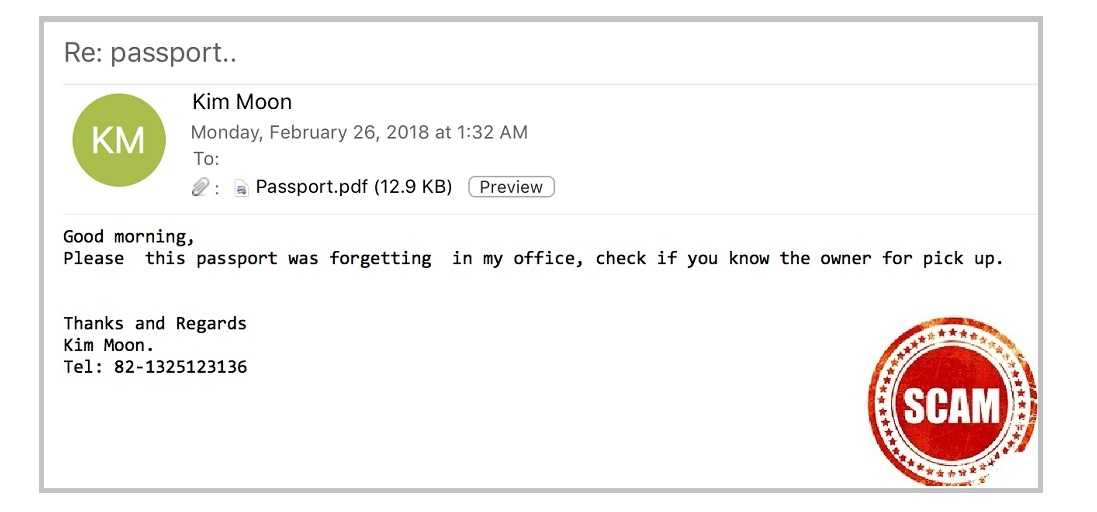
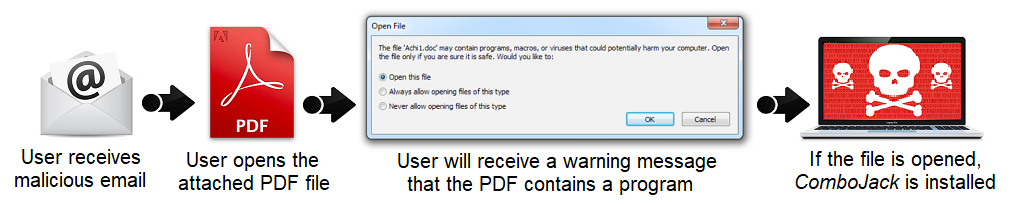
The scam is called ComboJack. Malicious code is distributed via an email spam campaign. If a user opens a PDF document disguised as a copy of a passport that a colleague supposedly left in the office, an embedded object attempts to exploit a DirectX flaw. If it’s successful, ComboJack is in full force and checks the clipboard every half-a-second to see if a pattern for a cryptocurrency payment system address is copied to it.
Just because this particular attack is directed toward stealing cryptocurrency, we shouldn’t dismiss it as affecting only a small group. What is important is that if someone can redirect a user based off something pasted to the clipboard, that user can be redirected anywhere else too. The malware authors can just as easily have the monitoring program watch for banking-related words and try to steal financial account login credentials too, or those for your electronic healthcare accounts.
In this case, if ComboJack detects a cryptocurrency address, it replaces it with an address from an internal list that sends the user to a fake site where they paste in their cryptocurrency address. Then POOF! The currency is gone and there is nothing the user can do about it.
This one takes advantage of the fact that these addresses are notoriously difficult to remember or type. So users tend to copy and paste them into the related websites.
We are not going to ask you to memorize a long address. And while retyping it in may prevent this from happening to you, it’s probably not realistic either.
 Instead, avoid downloading the malicious code in the first place by avoiding falling for phishing. If you get any type of attachment in an email that you are not expecting or is from someone you don’t know, just don’t open it. If you are not sure, pick up the phone and call the sender to verify first.
If your colleague really did lose or leave his or her passport behind, you can bet you’ll get a call for help if the email isn’t returned quickly. So there is no need to panic and do something rash when you are not sure. Just place a call and take care of it right away. Then you can go on with your day.
For banks and credit unions
Share this article with your members
Copy a ready-made summary and link for your newsletter, website or social posts.