For all iPhone users, there’s an iMessage phishing campaign getting a lot of attention—and not in a good way. If you’re counting on Apple’s phishing protection to disarm malicious texts, know that those devious hackers have found a way to disable it. If you have an iPhone, the message below will make you a bit smarter and safer.
Apple’s iMessage phishing protection is no doubt a helpful security tool, but only when it works. Typically, when an SMS phishing text (aka “smishing”) arrives on your iPhone, links are greyed-out and not able to be clicked. It’s a sign to users that the text and link are malicious—and we know how malicious links can be.
2
There’s no doubt many texts we see ask for a “Yes” or “No” reply to continue getting more information or have it stop. With this hack, texts also ask for a “Y” or “N” response, but little do we know, responding can disable iPhone’s iMessage phishing protection. That means unsuspecting victims are right where a hacker wants them—following a malicious link.
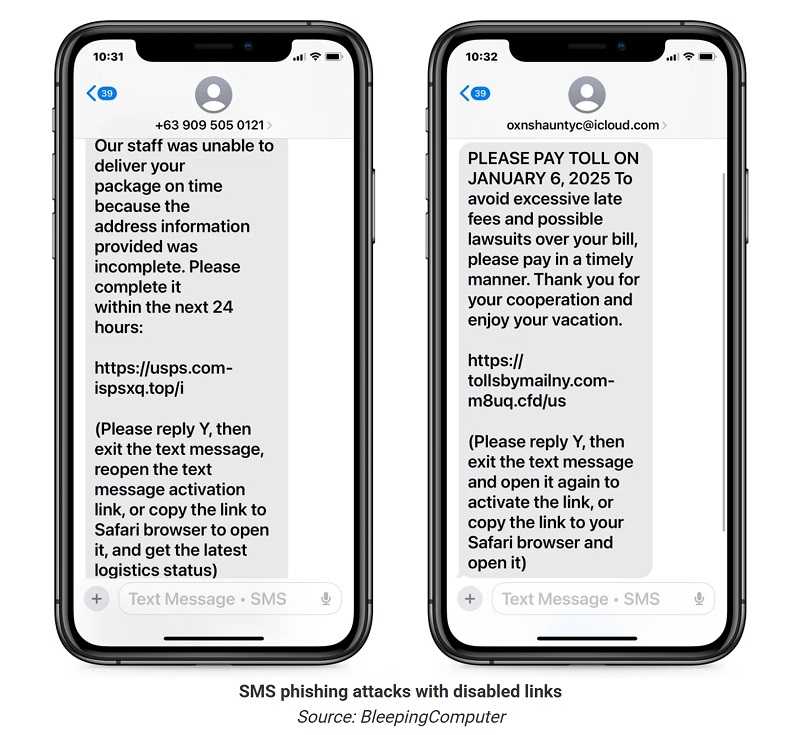
Clicking on a malicious link can lead you to a spoofed website that steals your PII. Malicious links can also install malware on a device and download software like spyware and ransomware. This iMessage hack disarms those who expect iPhone’s phishing protection to catch the phish. Not seeing the link greyed-out gives users a false sense of security and they’re much more likely to trust it.
2
Whether you’re using an iPhone or Android, phishing texts with malicious links are a daily occurrence. The best approach is a good dose of scrutiny, especially if you don’t know and trust the sender. Be aware of texts using a sense of urgency, tugging at heartstrings, or otherwise want you to act quickly and without thinking.
Most of all, trust your instincts. A nanosecond of doubt is the best reason to delete the text. You won’t be sorry you did, and not sorry you didn’t.
For banks and credit unions
Share this article with your members
Copy a ready-made summary and link for your newsletter, website or social posts.