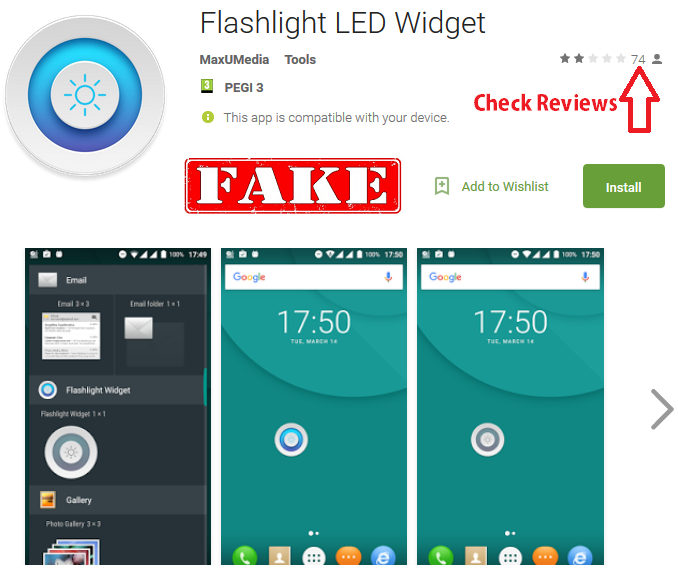
Another example of how malware is changing and evolving has shown up in the Google Play Store. This time, it is cleverly disguised as a flashlight application. However, it doesn’t merely light your way, it will also light up your face when it takes your photo and illuminate your frustration as it empties your bank account and sends the information on your device to the mother ship. And, to top that off, should this one appear on your device you might have a bit of a hard time removing it.
 It can affect all versions of Android. It is tricky, because rather than having a static set of apps that it targets and mimics, it will change based on whatever is installed on the device already. It has been seen masquerading as some banking apps, but also as Facebook, WhatsApp, Instagram, and even the Google Play Store.
 1. When looking for apps to install on devices, make sure they are from the legitimate app stores like Google Play, Apple Store and Amazon. While this obviously is not a failsafe method for avoiding malware, it certainly increases the chances that it is safe. These stores require additional scrutiny of all the applications that can be placed in it and that does lower risk of installing malware.
2. In addition, because malware is so prevalent these days, always make sure security software is installed on all devices. Most certainly this should include anti-malware and anti-virus software, but also VPN apps for connecting securely to corporate networks and for doing sensitive tasks like online banking when in public spaces. Public WiFi is not a secure way to perform these functions, so a VPN can significantly reduce the chance of a hacker stealing login credentials should there be a reason the task cannot wait until a secure connection is available.
3. All devices should be backed up regularly. This can be done to the cloud or to a computer. In any case, should malware strike it is much easier and less frustrating to restore it from a recent backup than to start over from factory settings. It can also help in avoiding paying a hacker to decrypt the information if ransomware makes it onto a device.
4. Checking the ratings for apps can also help determine if they are safe to install. In this case, it was installed over 5,000 times and there likely were some warnings in the ratings that it probably was not a good idea. If there are only a few ratings for an app, it is worthwhile to let others be the early adopters and find the bugs and post about them first; especially when the app developer is not quite so well known as perhaps Disney, EA Games, or Nintendo.
 Other tasks this malware can do include, locking devices (likely so fraud cannot be detected as bank accounts are being emptied), display fake notifications from intercepted texts to bypass multifactor authentication (MFA), and display fake screens that look like the real ones on the device in an effort to steal login credentials.
One way this does its thing is to request administrator rights to the device. Always question when any application requests these. The vast majority of the time, they are not needed for the app to function correctly. So, if that pops up it should be a red flag that perhaps what is about to be installed is up to no good.
 Although not easy, this annoying app can be uninstalled. To do so, it requires booting the device into safe mode (which prevents third party apps from launching), removing administrator rights to the “Flashlight Widget,” removing the app and rebooting the device again. There are instructions on the Internet on how to do this for a given device.
ESET sent notification of this malware on March 30 to Google. It was removed from the Google Play store on April 10, so should you need a flashlight app you will have other options that perhaps don’t light up your world so negatively.
For banks and credit unions
Share this article with your members
Copy a ready-made summary and link for your newsletter, website or social posts.