SMS fraud occurs when messages are sent from device without the user’s knowledge. Users may also be subscribed to paid online services; again, without their knowledge. This is what has been happening for an undetermined time to some Android owners who downloaded any of over 50 malicious apps from the Google Play Store starting in 2015. Security Company, Check Point determined that overall, in excess of 4.2 million downloads occurred of these apps. That’s a 282% increase since 2015 and accounts for 10% of all malicious apps found in the Google Play Store.
 Android devices that have the Google Play application installed have a nifty feature called “Google Play Protect.” This tool helps users avoid downloading such apps from the store. If you haven’t enabled that, it is recommended that you do so.
In addition, if you have downloaded any of the following apps over the past two years, they may be malicious. It’s estimated these were downloaded over one million times each. The first one, between one and five million times:
- I Love Filter
- X Wallpaper
- Horoscope
- X Wallpaper Pro
If you do have one of these, consider uninstalling it. Remember that this list is not all-inclusive either. There are many others that fit into this category. There are millions of apps available for download so two basic rules will give you a giant advantage in avoiding a malicious app: First, only install apps from the official app store. Stay away from loading apps from non-official stores or sites. This is called Sideloading, and it exposes users to a much greater risk. Second, check the reviews on apps before installing from the official store. If it is a scam in any way, people will report it.
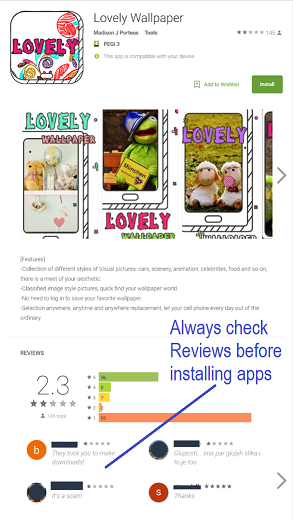 In a recent finding, Check Point researchers found a version of a previously bad app, Lovely Wallpaper, that was modified and reused. In one case, the malicious app racked up over $12 per month in charges by using SMS fraud, leading to its nickname, ExpensiveWall.
Another action to look for when installing applications is what permissions it will ask for. In this case, it asks for permission to send SMS messages and access the Internet. If these are granted, it will also send details of the device to the cybercriminals.
If this ever happens when installing any application, you should question why it’s needed; especially if it’s a wallpaper or similar app. Other apps have requested administrator rights to devices. This is very rarely needed. In fact, for the average user, it will never be necessary so don’t grant it. If you do, a bad actor could have complete control over your device.
If you are searching for new tools on your smartphone or tablet, be sure to read the reviews before downloading them. Others who previously installed them will often report any oddities and you can use the information to possibly steer clear of the bad ones.
Check Point has a complete list of the apps that were found at its website. Many of them appear to have something to do with taking photos. They have all been removed from the Google Play Store, but if you downloaded any of them, consider deleting them manually.
For banks and credit unions
Share this article with your members
Copy a ready-made summary and link for your newsletter, website or social posts.