

A macro-based malware has been found that affects MacOS. It joins the Bash Bug, iWorm Malware, MAC Defender (not to be confused with the legitimate product, MacDefender), and others that target Apple users. It’s not particularly advanced either, but it’s real evidence that as Mac becomes more popular, the cybercrime world is paying more attention and starting to exploit that.
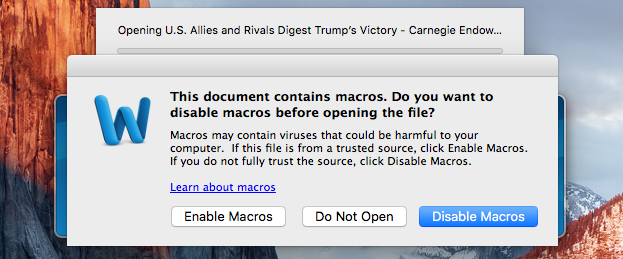
This one comes in email, of course. It comes with an attachment that researchers found has a title of "U.S. Allies and Rivals Digest Trump's Victory – Carnegie Endowment for International Peace.docm." Once it’s clicked, a dialogue box opens “warning” the user that it contains macros. If the macros are enabled, nasty things happen. Primarily, it downloads malware infecting the computer. Hackers can then monitor webcams, access the browser history, and steal passwords and encryption keys.
 The simple way to avoid this is not to enable macros. This should be everyone’s default action. In older versions of Microsoft Office, they were enabled upon installation and it was the user’s responsibility to deactivate them. In versions released within the last ten years or so, they are disabled by default. It’s best to leave them that way. If you don’t know who created the macros, it is much less risky to decline any request to run them.
 Be careful about just clicking dialogue boxes away. Yes, it can seem exhausting with all the popups wanting you to do something. However, it’s worth the effort to spend a few extra seconds to read them before taking an action. If you are in doubt at all, click the negative or deny response and if you cannot close the window without installing something, shut the program down and shut down your computer. When it comes back up, the dialogue should be gone.
 In addition, always make sure all software on a computer is kept updated. If a security or critical patch is released, don’t delay in applying it. Just make sure the update comes from trusted sources, i.e. the developers. To make sure this is the case, go directly to their websites and find the patches. You can also shut down your computer once in a while. When you turn it back on, if there are updates they will appear once it starts back up. Software often checks for updates upon system restart, so if you do this periodically, you can have more faith that the patches are indeed real ones.
The IP address used in the version of malware the researchers at Synack traced went back to Russia and was known to have been used for phishing attacks previously. They also found that this macro malware worked only on MacOS and failed when attempted on Windows or Pages.
For banks and credit unions
Share this article with your members
Copy a ready-made summary and link for your newsletter, website or social posts.




