


A new version of a ransomware that can evade detection has been seen in a new and improved state by researchers at Kaspersky Labs. It came onto the scene last August, but is rearing its ugly head again; now with more dangerous results. A SynAck variant is now using a technique called Process Doppelganging to make it appear as if it’s a version of a legitimate process already on the machine, but it's actually doing something malicious. This technique makes it virtually impossible to detect. In fact, the only way you may know your computer is infected is when you notice the ransom note.
SynAck is the first ransomware detected that uses Doppelganging, so far. But that isn’t the only thing that makes it dangerous. It can detect if it’s being launched from a sandbox (a virtual space disconnected from the rest of the network) and if so, it will exit without a trace, leaving everyone none-the-wiser.
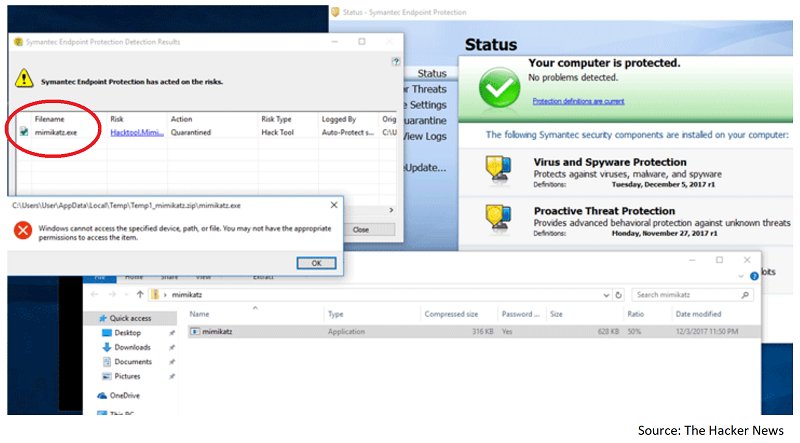
Tal Liberman, the head of the research team at enSilo used Mimikatz, a post-exploit tool that helps steal credentials from infected computers, to test Process Doppelganging againt various antivirus products runninig on different versions of Windows. When running the malware on a Windows computer on its own, Symantec caught the malware right away.
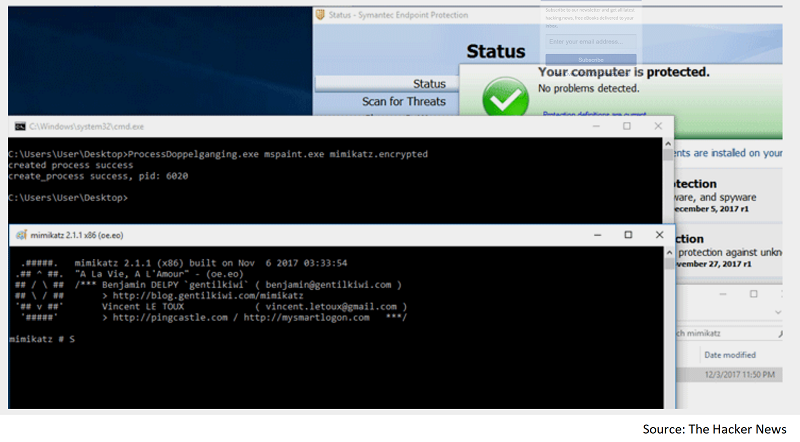
For Liberman's second test, he ran Mimikatz with Process Doppelganging, and the results were much different. Symantec was not able to detect the malware infection.
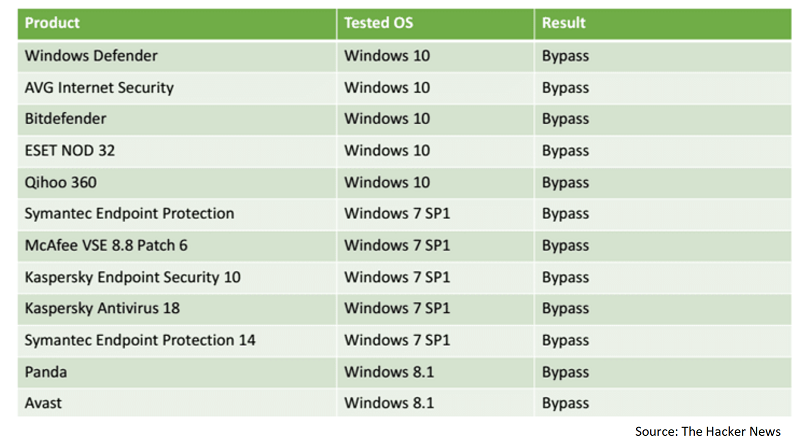
Symantec was not the only software unable to detect malware infections when using Process Doppelgangin, the below chart shows all the products tested and particular version of Windows used for the testing.
Of course that is not all, but suffice it to say that it’s a bugger and as far as can be determined, it makes its way into the network via RDP, or remote desktop protocol. This tool allows remote access to another machine. Often it’s used by IT departments to troubleshoot an issue on an end user’s computer so a person doesn’t have to have physical access to the computer. It may also be used in scams such as the infamous tech support scam, where a person will call on the phone and tell you something is wrong with your computer. That person will then happily help you fix it…for a fee.
 If you don’t need this RDP connection open, close it up and leave it that way. Most users don’t need it to be open and should never allow remote access to any device unless it is thoroughly understood why it’s needed. It certainly should never be opened up for an unsolicited caller claiming to be able to help you with a problem you didn’t report.
In addition, the latest SynAck attacks appear to be highly targeted with specific goals in mind toward enterprises in the United States, Germany, Iran, and Kuwait. An interesting mix of targets, indeed.
For banks and credit unions
Share this article with your members
Copy a ready-made summary and link for your newsletter, website or social posts.




