Cybersecurity in 2025 proved that everyday internet users remain prime targets, not collateral damage. From inboxes to smartphones, attackers refined tricks we are all very familiar with and introduced some new ones that made simply going online riskier than ever. More proof that we cannot just let threats from the past stay in the past when the calendar turns the page to a new year.
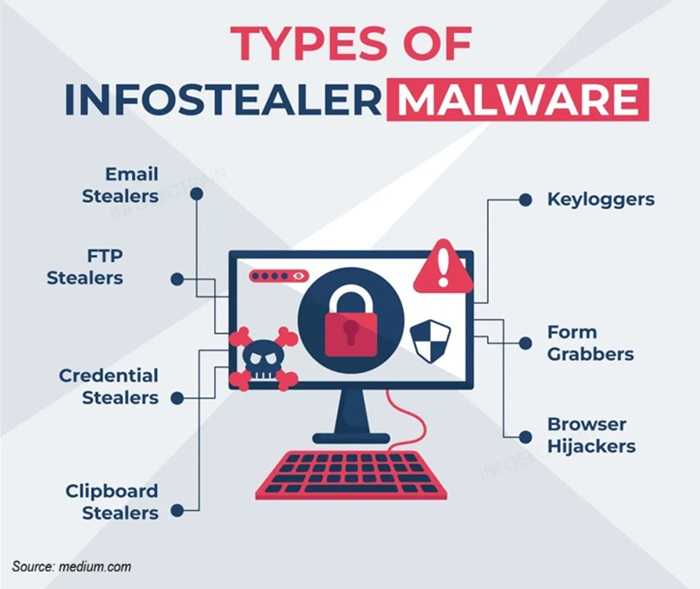
Infostealer malware dominated the year’s headlines after multiple massive credential dumps exposed hundreds of millions of usernames and passwords. These quiet infections harvested saved browser logins, email credentials, and crypto wallets, fueling account takeovers across major platforms.
Researchers uncovered billions of login credentials exposed online from datasets compiled by malware that steals passwords and other data from infected machines. One investigation found about 16 billion login records exposed across some 30 datasets, including credentials for services like Apple, Google, Facebook and Telegram — not because those companies were hacked, but because malware had harvested the data over time.

Phishing evolved again, with criminals leaning heavily into realism. Fake security alerts, bogus booking confirmations, and brand-perfect emails from companies like Apple, PayPal, and password managers lured users into handing over credentials or installing malware themselves. Just check out the recent LastPass scam where users were tricked into createing fake backups, handing information over to attackers.
Mobile threats surged, especially on iPhones. Several actively exploited OS flaws showed attackers could spy, steal data, or bypass built-in protections if users delayed updates. Android users also faced waves of malicious apps slipping into official app stores.
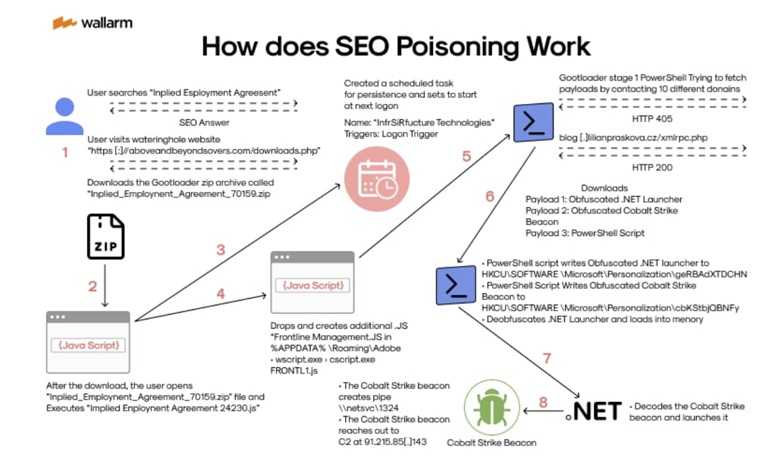
Search engine or SEO poisoning became a powerful weapon. Criminals pushed fake software download sites to the top of search results, tricking users into installing malware instead of legitimate tools. If it ranked high, many trusted it blindly. Google’s Chrome was used for this. But any browser is vulnerable.
SMS-based sign-in links came under scrutiny after researchers revealed how weak or long-lived login URLs could be guessed or reused, allowing attackers to hijack accounts without passwords.
Authorities warned of a surge in “smishing” attacks that were designed to trick users into clicking links that lead to credential theft or malware. These scams have used thousands of malicious domain names to lure iPhone and Android users.
Fake error messages and crash screens rounded out the year’s scams. Convincing pop-ups and counterfeit system failures pressured users into clicking “fix” buttons that quietly installed malware. Think of ClickFix scams.
Staying safe now depends on slowing down, questioning what you see, and keeping every device fully updated. Don't click suspicious links or attachments or in messages from those you don't know or are not expecting. Anti-virus software should be installed and kept updated at all times on all devices. And always apply patches and security updates as soon as you are notified there is one available.
For banks and credit unions
Share this article with your members
Copy a ready-made summary and link for your newsletter, website or social posts.